Mango AI Image to Video
Drag & Drop, Paste, or Click to Upload
PNG, JPG, WEBP, Max 10 MB
Video Results
Your AI-generated video is ready!
Example demo - start generating to unlock full controls
Image to Video Examples
Transform your Image to Video with AI
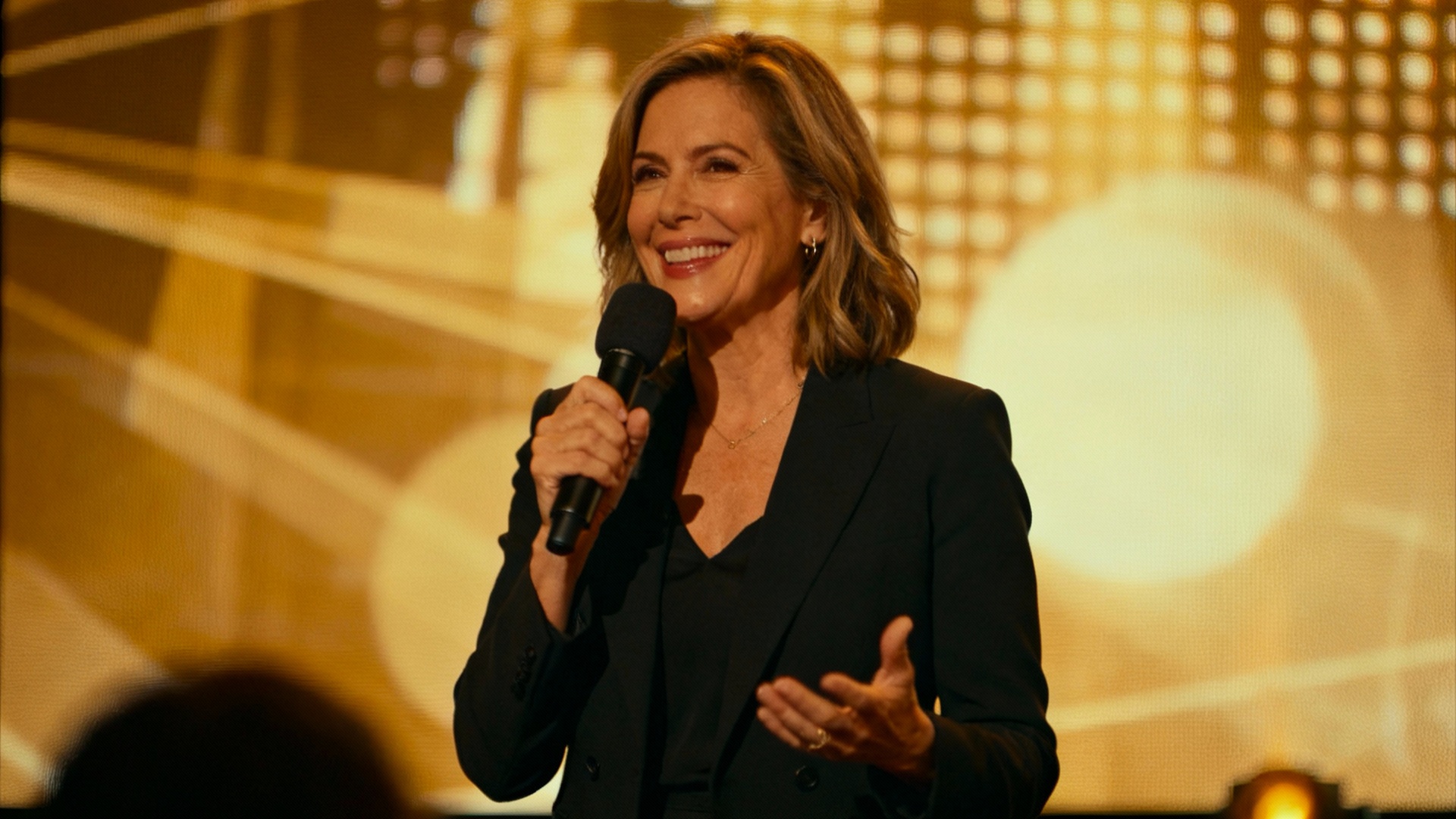
Prompt
A confident woman in her 40s stands on a stage with a microphone. The background shows a large LED screen with abstract visuals. She smiles and begins speaking to the audience: "Good evening everyone. Tonight, I want to share three powerful lessons about leadership and innovation." Her lip movements match her voice, and she uses expressive hand gestures while speaking.
What is AI Image-to-Video?
AI image-to-video is a cutting-edge technology that transforms static images into dynamic, high-quality videos using artificial intelligence. Powered by advanced diffusion models and neural networks, Mango AI analyzes your photo’s content, depth, and context to create natural-looking motion — from subtle camera movements to complex character animations.
Unlike traditional video editing software, our AI understands physics, lighting, and spatial relationships, producing videos with realistic movement and cinematic quality. Simply upload any image, describe the desired motion in a text prompt, and watch as AI brings your photo to life in seconds. No video editing skills required.
How to Convert Image to Video with AI
Upload Your Image
Drag and drop or select any photo — portraits, landscapes, product shots, or artwork. Supports JPG, PNG, and WebP formats.
Describe the Motion
Write a text prompt describing how you want the image to animate. Control camera pan, character movement, or background motion.
Generate & Download
Click generate and AI creates a smooth, high-quality video in seconds. Download in MP4 format, ready for social media or professional use.
Key Features of Mango AI Image-to-Video Generator
- •
Physics-Accurate Motion
AI models trained on real-world physics produce natural movement — hair flows, water ripples, and fabrics move realistically.
- •
Temporal Consistency
Advanced frame interpolation ensures smooth transitions between frames with no flickering or visual artifacts.
- •
High-Resolution Output
Generate videos up to 1080P at 60fps with crisp detail preservation from your original image.
- •
Prompt-Guided Animation
Control motion direction, speed, and style with natural language prompts — from gentle camera pans to dramatic zooms.
- •
Fast Generation
Produce a 4–10 second video in under a minute, significantly faster than traditional animation workflows.
- •
Synchronized Audio
AI-generated sound effects and music that automatically match the video’s mood and movement.
Use Cases for AI Image-to-Video
Social Media Content
Transform product photos into eye-catching video posts for Instagram Reels, TikTok, and YouTube Shorts. Boost engagement with animated visuals that stand out in crowded feeds.
Marketing & Advertising
Create compelling video ads from static campaign imagery. Animate brand assets and promotional graphics without a full video production budget.
Digital Art & Photo Animation
Bring old family photos to life with natural motion. Animate digital artwork, illustrations, and AI-generated images for creative storytelling.
E-Commerce Product Demos
Turn product listings into dynamic showcases. Show 360° rotations, usage scenarios, and lifestyle animations that increase conversion rates.
Advanced Mango AI Image-to-Video Capabilities
Superior Temporal Coherence
Mango AI’s image-to-video model delivers stronger temporal consistency than current competing solutions. Characters, objects, and scene elements maintain visual coherence across every frame — no flickering, identity drift, or background morphing. This consistency is critical for producing professional video content that meets commercial quality standards.
Text-Based Video Editing After Generation
Once your image-to-video is generated, Mango AI lets you refine it using natural language commands. Swap backgrounds while preserving the subject, adjust facial expressions, add visual effects and cinematic transitions, or restyle the entire scene. You can also expand the video frame beyond its original boundaries and intelligently fill in missing areas of the composition.
3× Faster Rendering with Second-Level Output
Mango AI renders image-to-video conversions 3× faster than traditional video tools, enabling “second-level output” — upload an image, describe the motion, and receive a polished video clip in seconds rather than minutes. This speed advantage makes it practical to produce multiple video variations in a single creative session.
VR/AR Integration for Immersive Video Creation
Mango AI provides deep integration with VR headsets including Meta Quest, enabling creators to generate and adjust 3D video scenes in real-time within a virtual space. Upload a 2D image, convert it to a 3D scene, and explore or refine the result in an immersive AR/VR environment — opening new possibilities for spatial video content and interactive storytelling.
Frequently Asked Questions About AI Image-to-Video
Is there a free AI image to video generator?
Yes. Mango AI offers a free AI image-to-video generator that lets you animate photos and turn images into videos without any cost. You can upload a photo, describe the desired motion, and generate a short video clip — no credit card required. Paid plans unlock higher resolution, longer durations, and priority rendering speed.
How do I convert a photo to a video using AI?
Converting a photo to a video with AI is simple: upload your image to Mango AI, type a text prompt describing how you want it to move (e.g., “camera slowly zooms in while the subject turns to face the camera”), and click Generate. The AI analyzes depth, objects, and context in your photo, then produces a smooth animated video in seconds. No video editing experience needed.
What is the best AI image to video generator?
Mango AI is one of the best AI image-to-video generators available, offering physics-accurate motion, temporal consistency, and up to 1080P/60fps output. Unlike many alternatives, Mango AI supports synchronized audio, prompt-guided animation control, and fast generation — making it ideal for both casual users and professional content creators.
Can AI animate a still image?
Yes. AI can animate still images by predicting realistic motion patterns based on the image content. Mango AI’s image animation technology adds natural movement to photos — characters can turn their heads, fabrics ripple in the wind, water flows, and camera movements create cinematic effects. The AI preserves the original image quality while adding smooth, natural-looking animation.
How to turn a picture into a video with AI?
To turn a picture into a video using AI, upload your image to Mango AI’s image-to-video tool, enter a prompt describing the desired motion or camera movement, and click Generate. The AI will produce a 4–10 second animated video from your still image. You can download the result as an MP4 file, ready to share on social media or use in your projects.
Does Mango AI image to video add watermarks?
Free-tier generations include a small watermark. Upgrading to a paid plan removes watermarks and unlocks full commercial usage rights, higher resolutions, and extended video duration. All generated videos are downloadable in MP4 format for easy editing and sharing.
What image formats does AI video generation support?
Mango AI supports all common image formats including JPG/JPEG, PNG, and WebP. For best results, use high-resolution source images with clear subjects. The AI works with portraits, landscapes, product photos, digital art, illustrations, and AI-generated images.
Can I use AI image-to-video for commercial projects?
Yes. Videos generated with Mango AI’s paid plans include full commercial usage rights. You can use them in social media ads, product demos, marketing campaigns, client projects, and monetized content. Free-tier videos include a watermark and are intended for personal and evaluation use.
Bring Your Photos to Life with Mango AI
Turn static images into dynamic AI videos with prompt-guided motion, cinematic framing, and optional synchronized audio.
No credit card required · Free tier available